
A Data Engineer’s Guide to Vector Databases (Part 2): Full-Text, Semantic, Hybrid Search and Reranking with pgvector
Learn how to integrate vector embeddings, similarity search, and reranking techniques directly within Postgres, no extra infrastructure needed.

In our previous post, we explored the core concepts every data engineer should understand before working with vector databases, a foundation that’s essential for building AI-powered applications or collaborating effectively with AI engineers.
Note: If you haven’t already, start with A Data Engineer’s Guide to Vector Databases (Part 1) to understand the core fundamentals before diving into this one.
Now, it’s time to turn theory into practice.
When it comes to vector databases, the market offers a wide range of options, including Pinecone1, Weaviate2, Qdrant3, Milvus4, LanceDB5, and others. For instance, LanceDB stands out for its developer-friendly design and SDKs in Python, TypeScript, and Rust. Its tight integration with the Python ecosystem makes it especially appealing for Python developers.
But in this post, we’ll take a different path. Instead of introducing yet another standalone system, we’ll explore pgvector6, a powerful PostgreSQL extension that adds vector storage and similarity search directly into our existing Postgres database.
If you’ve been curious about adding AI-powered search or embeddings without deploying and managing a separate infrastructure, pgvector is an elegant and practical solution worth exploring.
In this post, we cover:
Understanding pgvector: What it is and how it works under the hood.
Hands-on vector databases: Step-by-step guide to building and using them.
Search techniques: Exploring full-text search, semantic search, and hybrid search strategies.
Improving search relevance: How to rerank results effectively using:
Reciprocal Rank Fusion (RRF)
CrossEncoder
ColBERT
External API-based
When not to use pgvector: Key scenarios where vector databases may not be the right choice.
In part 3, we’ll take things further by covering more advanced topics. We’ll explore indexing strategies to optimise search performance at scale, and then put everything together by building a simple chat agent that combines retrieval with an LLM to create a working RAG application. Stay tuned!
Note: The implementation can be found in the GitHub repository7.
What is pgvector?

pgvector is an open-source extension for PostgreSQL that allows us to store vector embeddings, such as sentence embeddings or image features, and perform similarity searches using metrics like cosine distance, inner product, or L2 distance. It integrates naturally with standard SQL, so anyone familiar with SQL can query vector data just like any other table.
We can install it on a self-hosted PostgreSQL instance or use it through cloud providers such as AWS RDS8 or Google Cloud SQL,9 or Azure Database for PostgreSQL10 of which supports the extension.
Note: While pgvector is compatible with several PostgreSQL versions, specific features in the latest versions (like 0.8.0) may require newer PostgreSQL releases.
Developers and data engineers are increasingly adopting pgvector for several reasons:
It’s just Postgres: No need to learn a new query language or maintain a separate database, pgvector works directly within PostgreSQL.
Unified data management: Store vector data alongside transactional or analytical data without managing multiple systems.
Familiar tools and syntax: Run SQL joins, filters, and aggregations on vector data just like any other table.
Open source freedom: No vendor lock-in or hidden costs, thanks to PostgreSQL’s permissive license.
For many retrieval-augmented generation (RAG) or semantic search applications, pgvector provides all the necessary features, including vector indexing and multiple similarity search methods, making it a powerful and convenient choice for modern applications.
How does pgvector work?
Let’s start with an example:
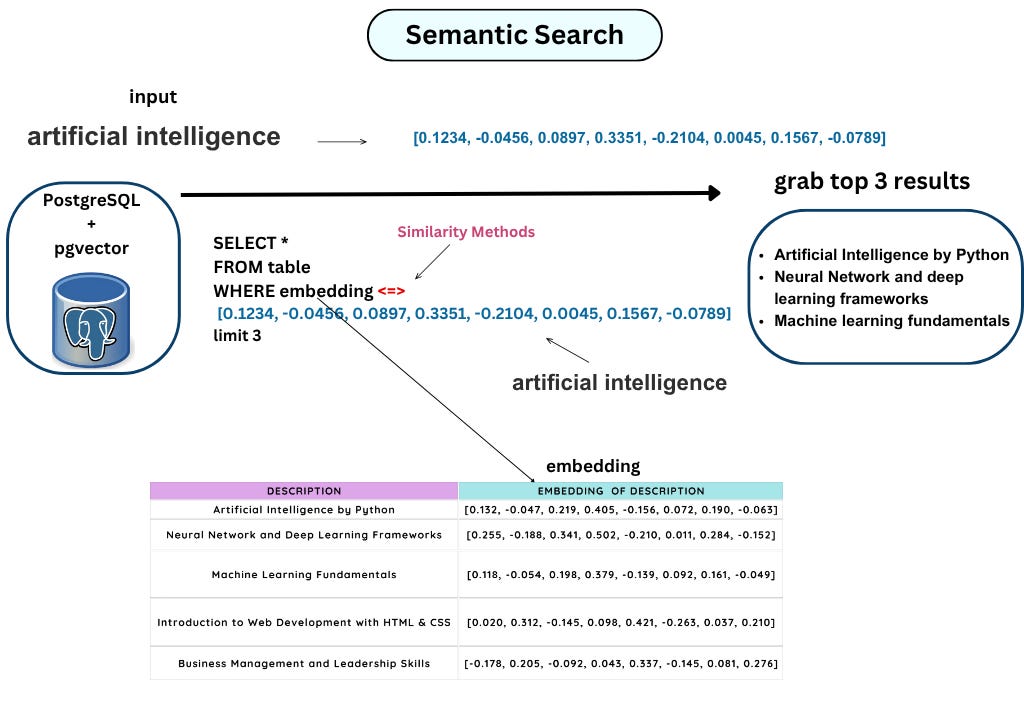
If we take a closer look at the above query, the first thing we’ll probably notice is this unfamiliar operator (<=>). This operator isn’t part of standard PostgreSQL; the pgvector extension provides it. We can only use it (and other similarity functions) after installing pgvector.
In this example, the operator(<=>) calculates the L2 distance11, which is one of several methods for measuring how similar two vectors are. L2 distance measures the straight-line distance between two points in vector space. There are other similarity metrics we can use as well, such as L1 distance, dot product, and cosine similarity.
Each method measures “closeness” between vectors in a slightly different way. Pgvector in PostgreSQL facilitates vector similarity searches using several methods and operators, primarily for finding nearest neighbours based on different distance metrics.
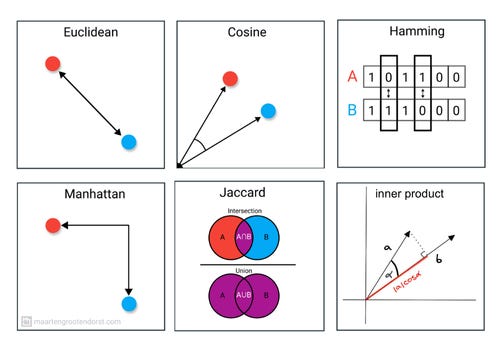
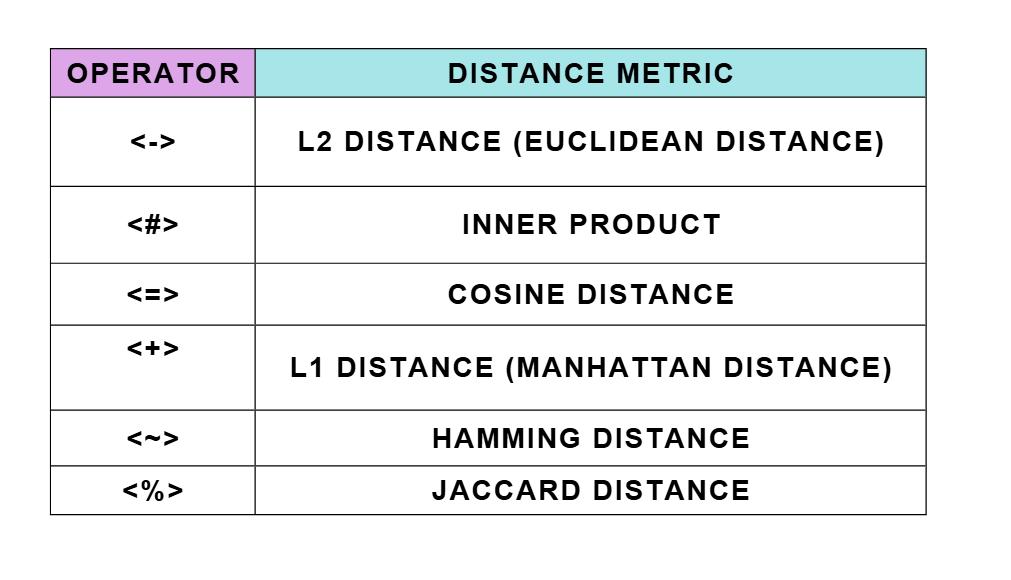
Because the query includes LIMIT 3, it returns the three most similar items from the table, based on the chosen similarity metric.
Now, let’s look at what’s happening under the hood. The table stores vector embeddings of item descriptions, and the query compares these stored vectors against an input vector. In this example, the input represents the vectorised form of a text. Since vectors can only be compared to other vectors, we first need to convert the input text into its vector representation before performing the similarity search.
Now that we’ve covered the theory, let’s move on to a hands-on demonstration to see pgvector in action.
Step-by-Step Guide: Using pgvector in PostgreSQL
Note: For the complete implementation, check out the GitHub repository12.
1. Create a Database
There are several ways to set up a PostgreSQL database:
We can install it directly on our machine,
Use a cloud-hosted service,
Or run it inside a container.
In this example, we’ll use Docker13, which makes setup quick and easy without manual installation.
Example command:
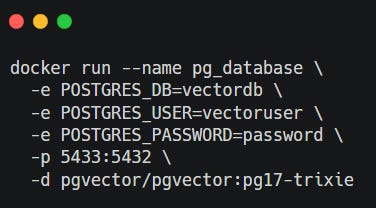
Note: If you are not familiar with Docker, you can check this beginner-friendly post here :

2. Connect to the Database
Once PostgreSQL is running, connect to it using the psql command-line tool:
psql -h localhost -p 5433 -U vectoruser -d vectordb
This connects you to the vectordb database using the username vectoruser on port 5433.
3. Enable the pgvector Extension
After connecting, we can enable the pgvector extension, which allows PostgreSQL to handle vector data and perform similarity searches.
CREATE EXTENSION IF NOT EXISTS vector;
The extension adds vector types, operators, and distance functions for semantic search and machine learning use cases.
4. Create a Table with a Vector Column
Let’s create a table to store items along with their vector embeddings: