

Introduction to ktx: The Open-Source Context Layer for Data Agents
An overview of ktx, the open-source context layer that combines semantic definitions and business knowledge for data agents.


You just gave your AI agent access to your warehouse. You asked a simple question: “What was our revenue last month?”
The agent runs a query. It returns a number. You share it in the Monday standup. Ten minutes later, your finance lead pings you: the number is off by 20%.
The agent included refunded orders. It queried the wrong table. It invented its own join. Nobody agreed to that definition of revenue, but the agent didn’t know that.
This is the silent problem with AI agents in data teams today. The agent isn’t dumb, it’s blind. It can see your schema. It cannot see your team’s agreed-upon definitions, which joins are safe, what “active customer” means, or that the acct_tier_v2 column is stale even though it still exists.
Every query starts from scratch, and reasonable SQL can quickly become wrong SQL. The output looks correct. The query runs without errors. It simply uses the wrong joins, filters, or metric logic, and nothing tells you that until someone checks the numbers.
As AI agents become a larger part of how organisations work with data, the gap between data access and data understanding is becoming increasingly apparent. Access to data alone is no longer enough. Agents also need access to the metadata, business context, and semantic definitions that give data meaning. As AI-native systems become major consumers of modern data platforms, the need for a dedicated context layer is becoming increasingly important.
ktx1 is one of the first open-source projects built specifically to address this challenge. It is a self-improving context layer that sits between your data stack and your agents, helping them query data in line with your team’s approved definitions and business rules.
In this post, I’ll cover:
Why data agents need more than a database connection
What is ktx?
Why ktx?
How does ktx work?
Testing ktx with the Orbit Demo Stack
Learning Resources
Why Data Agents Need More Than a Database Connection
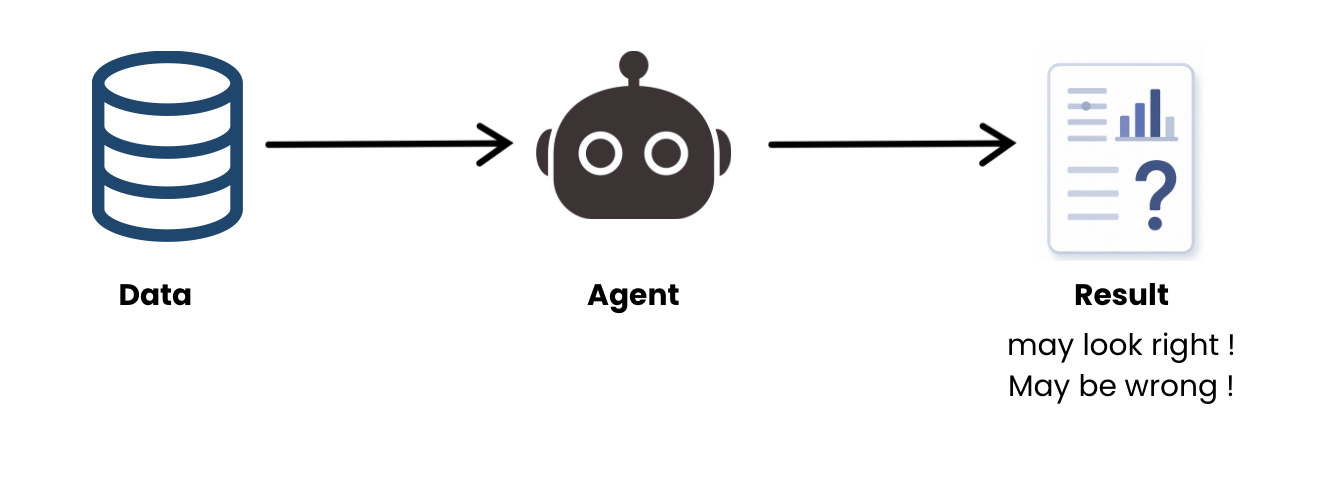
AI agents are quickly becoming part of the modern data stack. They can answer questions, write SQL, investigate anomalies, and even update dashboards. But despite their capabilities, most agents still operate with a surprisingly limited understanding of the business context behind the data.
A typical agent is given access to a warehouse and its schema. It can see tables, columns, relationships, and data types. What it cannot see are the decisions, definitions, and assumptions that make those tables meaningful.
For example, an agent usually doesn’t know:
Which revenue metric does finance consider the source of truth?
Which joins are approved, and which create fan-out issues?
That
orders.amountincludes refunded transactions unless filteredHow does your team currently define ARR, churn, or active customers?
Whether a metric definition changed six months ago
This creates a fundamental problem. The agent has access to the data, but not the context behind it.
As a result, every task starts from scratch. The agent explores the schema, makes assumptions about which tables to use, and generates SQL based on what appears reasonable. The queries often run successfully and return results that seem right. The challenge is that “seems right” does not always mean “correct.”
This is where semantic layers become important.
A semantic layer provides a shared set of business definitions, metrics, relationships, and rules that sit above the raw warehouse. Instead of every user or tool defining revenue differently, everyone works from the same approved definitions.
The challenge is that traditional semantic layers were designed primarily for BI tools and dashboards, not AI agents. They excel at producing correct SQL, but they rarely capture the surrounding business knowledge that agents need as well.
On the other side, organisations often maintain documentation in Notion, Confluence, or internal wikis. These systems contain valuable business context, but they cannot validate joins, compile metrics, or generate trustworthy SQL.
This leaves most teams choosing between two imperfect approaches:
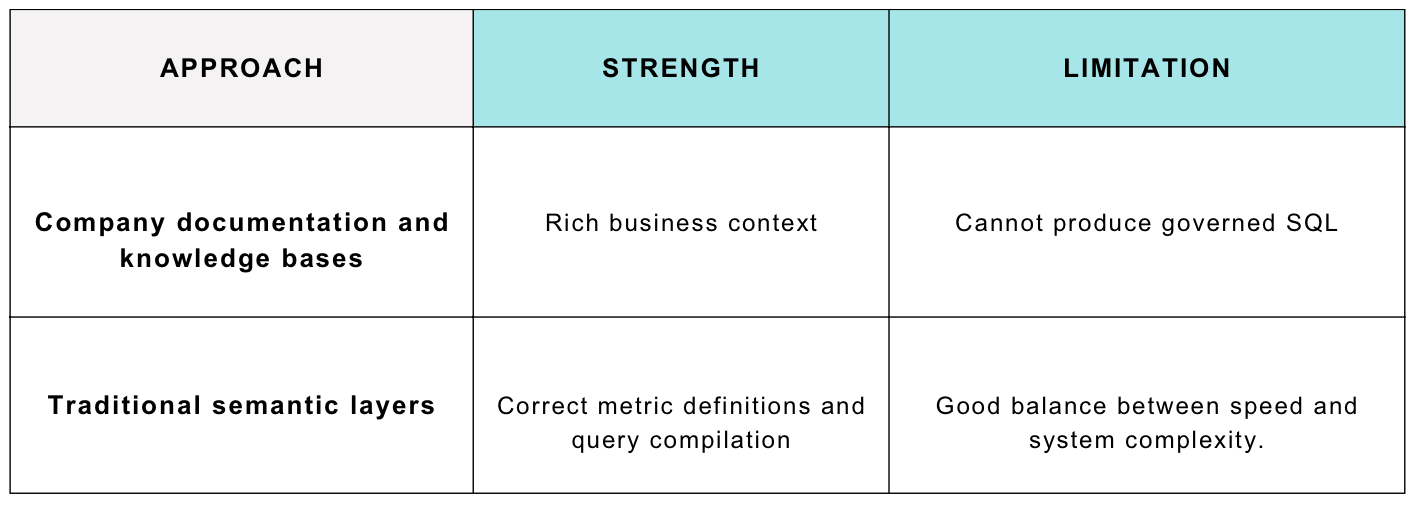
ktx combines both approaches into a single context layer. It provides executable semantic definitions alongside searchable business knowledge, allowing agents to understand not only how to query the data but also how to interpret it correctly.
Rather than forcing agents to rediscover context on every task, ktx gives them a reviewed and governed starting point built from the knowledge your team has already created.
What Is ktx?
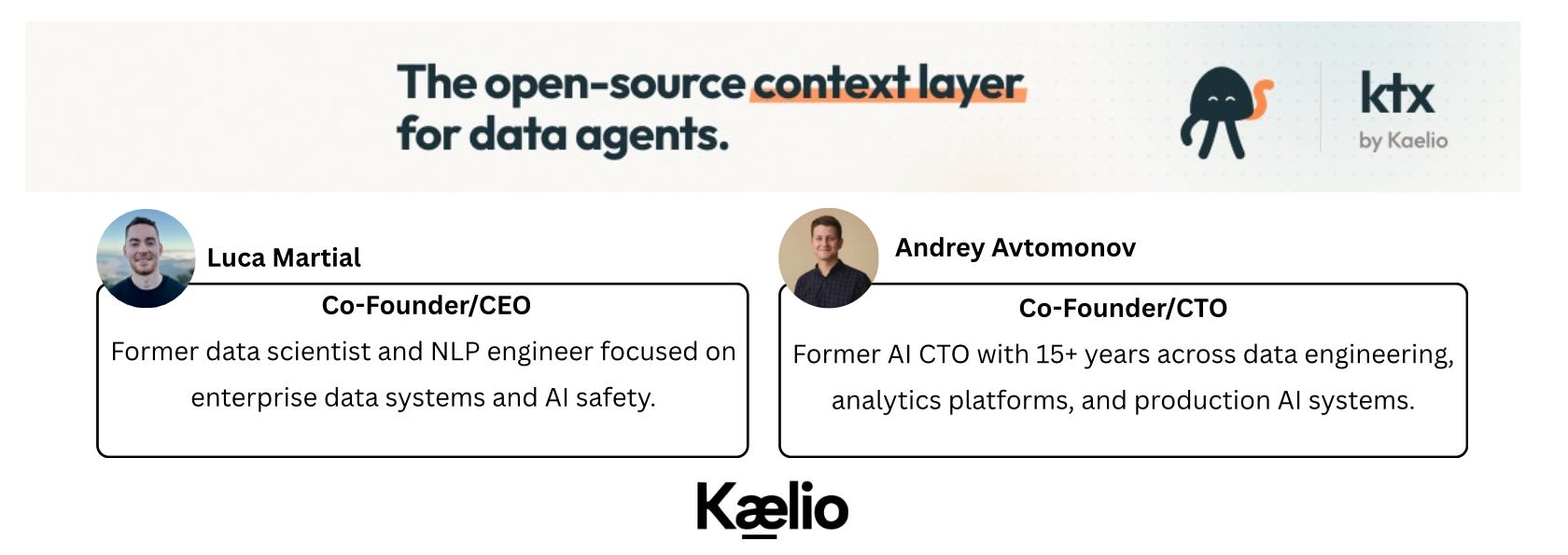
ktx (short for context) is an open-source, self-improving context layer for data agents, built by Kaelio, a Y Combinator-backed startup founded by Luca Martial and Andrey Avtomonov. Alongside the open-source project, Kaelio also offers ktx Cloud, a hosted platform with collaboration and governance features, and a managed Data Agent, a production-ready agent grounded in your context layer, for teams that want reliable AI on their data without building the infrastructure themselves.
ktx teaches agents how to query your warehouse accurately, from approved metric definitions, joinable columns, and business knowledge it builds and maintains for you.
It does this by maintaining two committed layers in your project directory:
semantic-layer/*.yaml: Structured, executable definitions: tables, grain, joins, measures, dimensions, and filters. The ktx compiler turns these into dialect-correct SQL, so agents never rewrite canonical queries from scratch.wiki/*.md: Free-form Markdown pages with business definitions, metric caveats, reporting policies, and historical context. These are searchable by agents and reviewable by humans.
Behind the scenes, ktx also maintains supporting artifacts such as source snapshots, search indexes, provenance metadata, and local state used to build, search, and evolve the context layer over time.
Both layers are plain files, committed to Git, diffable, mergeable, and reviewable exactly like code.
Note: As of this post, ktx supports PostgreSQL, Snowflake, BigQuery, ClickHouse, MySQL, SQL Server, and SQLite as primary sources, and integrates with dbt, MetricFlow, LookML, Looker, Metabase, Notion, and a growing list of BI tools, SaaS platforms, and orchestration tools, with more connectors rolling out.
Why ktx?
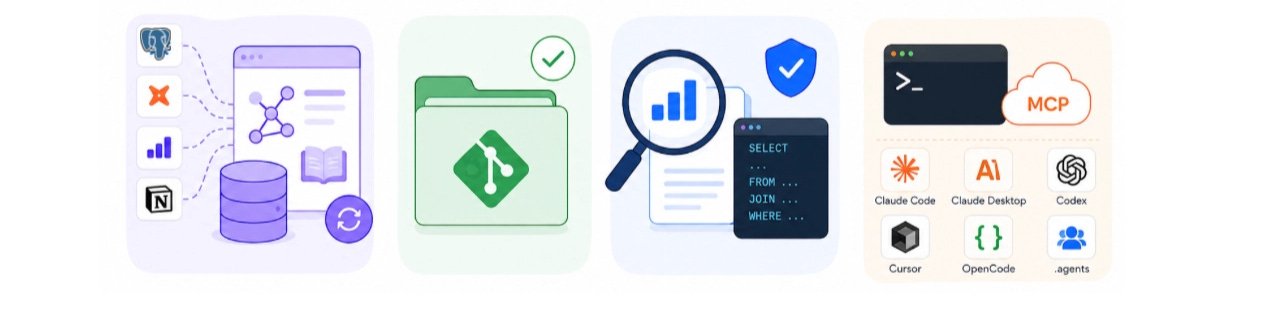
After testing ktx hands-on, here are the four things worth highlighting:
1. It Builds Context Automatically
Most semantic layers require teams to define metrics manually, joins, and business rules. ktx takes a different approach.
It connects to your existing data stack, warehouses, dbt projects, BI tools, and documentation platforms, and automatically generates the initial semantic layer and business wiki.
When your data stack changes, running ktx ingest again updates the context layer while preserving definitions your team has already reviewed and approved.
2. Context Lives in Git
Everything ktx creates is stored as plain files in your project directory.
That means your semantic definitions and business documentation can be committed to Git, reviewed in pull requests, tracked over time, and managed using the same workflow your team already uses for code.
Instead of context living in a separate platform, it becomes part of your engineering process.
3. Agents Use Approved Definitions
The semantic layer isn’t just documentation.
Agents can search for approved metrics and definitions, then compile them into SQL rather than generating queries from scratch. This helps ensure they use the same business logic your team has already agreed on, reducing the risk of incorrect joins, filters, or metric calculations.
4. Built for AI Agents
ktx exposes its context through both a CLI and an MCP server, making it accessible to modern AI assistants such as Claude Code, Cursor, Codex, OpenCode, and other MCP-compatible clients. It can also be integrated into custom in-house agents via its MCP server — compatible with any framework that supports MCP, including LangChain. Rather than giving agents only raw database access, ktx provides a structured way to discover business definitions, search context, and generate queries from approved semantic models. ktx also supports multiple AI providers for building and maintaining the context layer, including Anthropic and Google Vertex AI. This gives teams flexibility in how they deploy ktx and where AI-related costs are billed.
How Does ktx Work?
At a high level, ktx works in two stages:
1: Building the Context Layer
ktx starts by gathering information from across your data stack, including your warehouse, dbt project, BI tools, and documentation platforms.
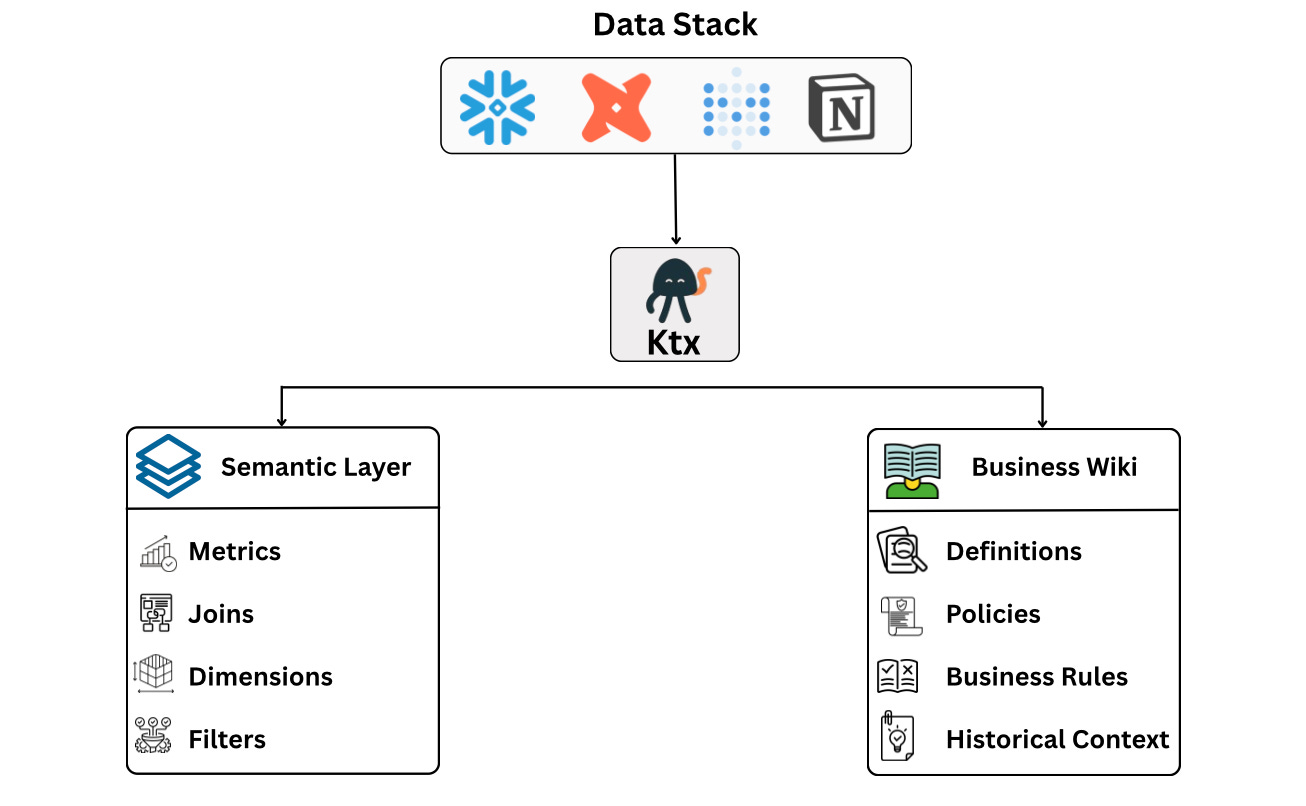
When you run ktx ingest, ktx analyses these sources and builds a context layer made up of two outputs:
Semantic Layer
The semantic layer contains structured definitions that agents can use directly, including metrics, dimensions, joins, filters, and relationships between datasets.
Business Wiki
The wiki captures the business context that doesn’t belong in SQL, including:
Metric definitions
Reporting policies
Historical decisions
Business rules
Team knowledge
Together, these two layers give agents both the technical understanding of the data and the business context behind it.
When your data stack changes, ktx can re-run the ingest process and propose updates to the context layer while preserving definitions your team has already reviewed and approved.
The result is a version-controlled context layer that both humans and AI agents can use.
2: Using the Context Layer to answer questions
Once the context layer has been built, agents can use it to answer questions more reliably.
Instead of generating SQL immediately, the agent first looks for approved business definitions and metrics.
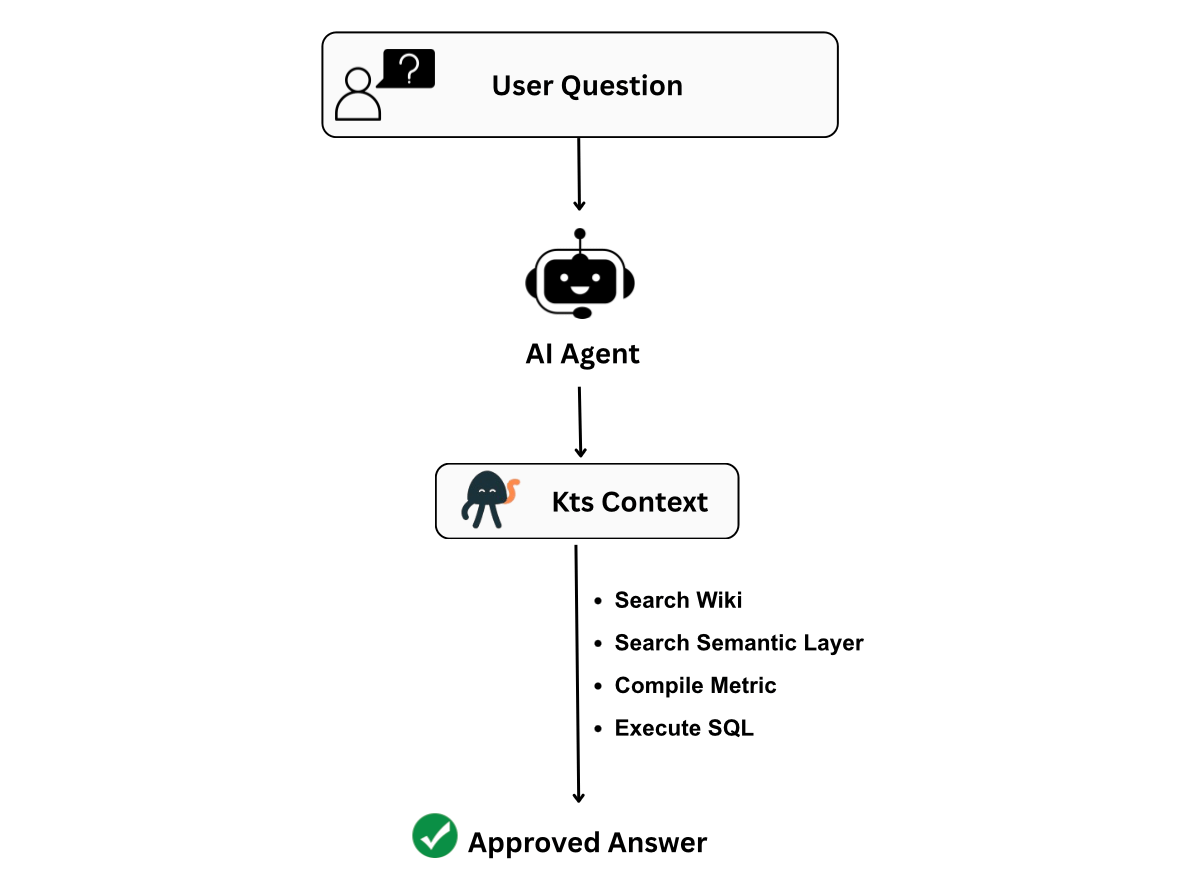
For example, if a user asks:
What was net revenue last month?
The agent can:
Search the wiki for revenue definitions and business rules
Search the semantic layer for the approved revenue metric
Compile the approved metric into SQL
Execute the query against the warehouse
This approach helps ensure the answer follows the same business logic your team already uses, rather than relying on the agent to infer the correct joins, filters, and calculations on its own.
Testing ktx with the Orbit Demo Stack
To evaluate ktx, I tested it against Kaelio’s public Orbit demo environment, which includes a PostgreSQL warehouse, a dbt project, a Metabase instance, and a Notion workspace.
The dataset contains approximately 38,000 rows across 56 tables, making it large enough to resemble a real-world SaaS analytics environment yet manageable for testing.
Getting started was straightforward. After installing the CLI:
npm install -g @kaelio/ktxI ran the setup wizard:
ktx setupThe wizard guides you through configuring an LLM provider, an embedding model, a database connection, and optional context sources such as dbt, Metabase, and Notion. Once configured, ktx automatically performs the first ingest and creates the project structure.
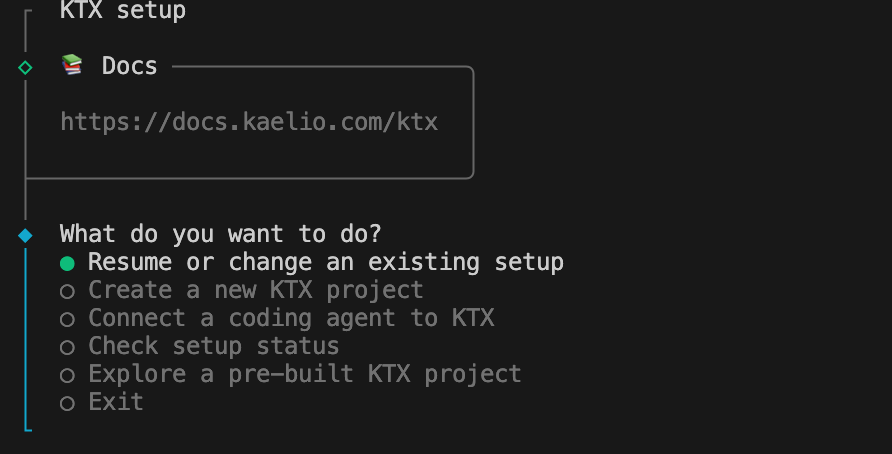
After setup, I verified the installation:
ktx status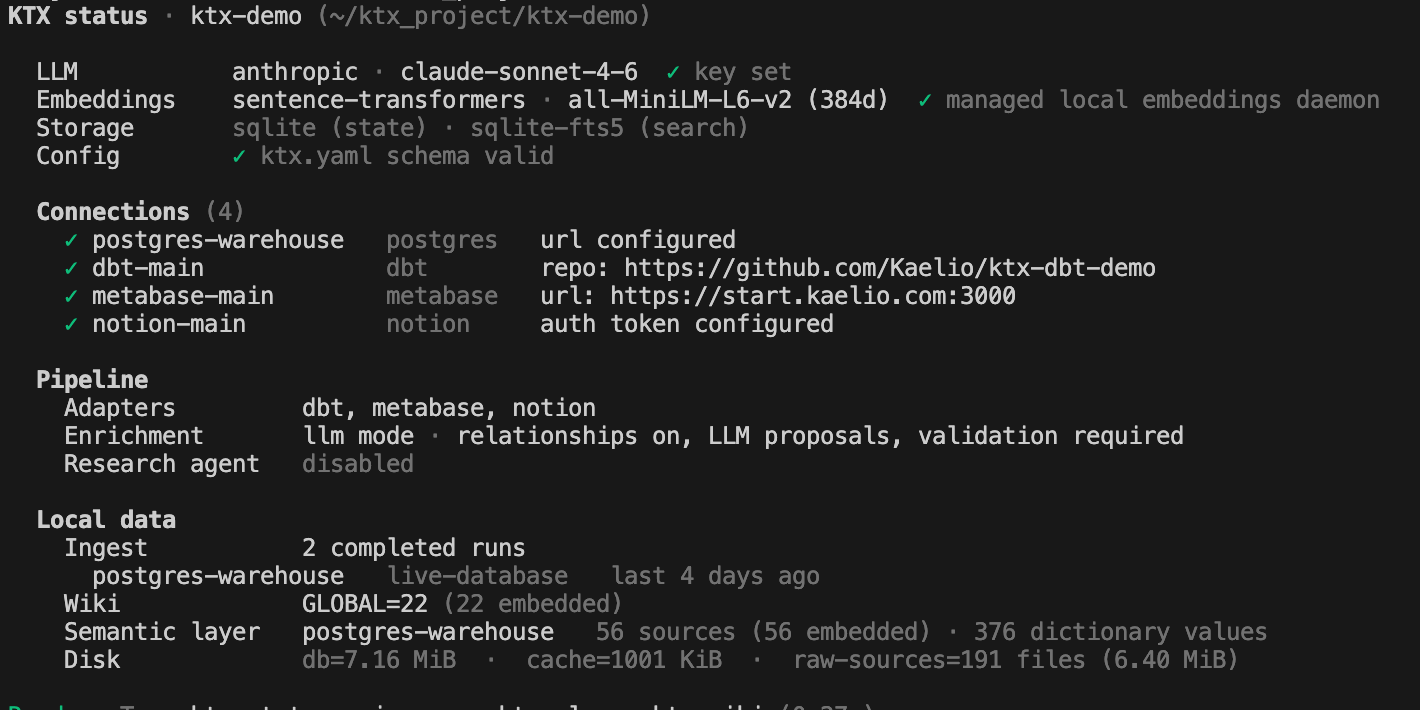
This showed all configured connections, the selected LLM and embeddings providers, and a summary of the generated context layer.
Building the Context Layer
To generate the semantic layer and business wiki, I ran:
ktx ingestThe full ingest took approximately 27 minutes across four connected sources.
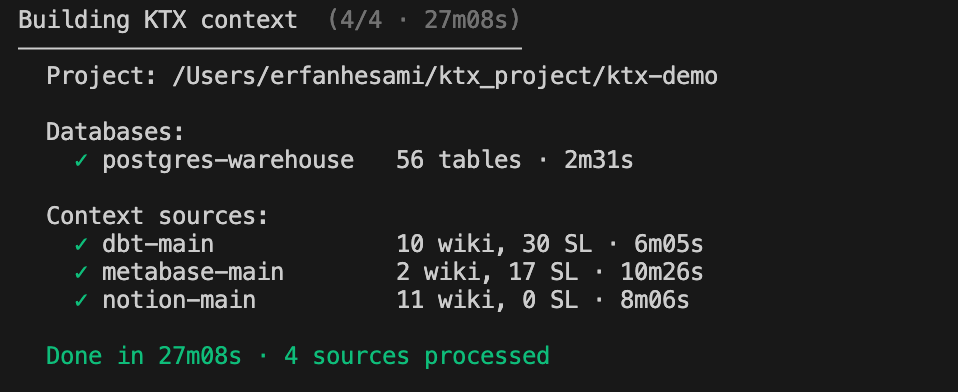
Once complete, ktx reported both semantic search and agent context as ready.
Exploring the Results
The first thing I tested was semantic search:
ktx sl "revenue"The results showed revenue-related models, governed metrics, and ownership information. What caught my attention was that ktx wasn’t simply listing tables. It was identifying which metrics were considered authoritative and which teams owned them.
For example, mart_revenue_daily appeared as the trusted source for net revenue with two specific labels pulled from dbt:
Governed metric: net_revenue and
Owner: finance.
This gives agents a much stronger starting point than simply exposing them to raw tables; the agent doesn’t just find the table; it also identifies who owns the definition and which metric is authoritative.
Next, I searched the generated wiki:
ktx wiki "subscription"This was the most impressive part of the test.
Rather than generating technical schema documentation, ktx showed actual business context: metric definitions, reporting policies, governed metric catalogues, and even historical policy changes.
One example documented a change to the activation metric definition that took effect on a specific date. Without that context, an agent could easily return inconsistent activation numbers depending on the period being analysed. ktx made that information discoverable before any SQL was written.
Compiling Metrics into SQL
To test the semantic layer, I compiled an approved revenue metric into SQL:

ktx generated SQL directly from the approved semantic definition.
The important point is that the agent didn’t invent the metric logic itself. It compiled a reviewed definition that already existed within the semantic layer, ensuring consistency with the definitions used by the business.
Testing the Agent Workflow
Finally, I connected Claude Code to the ktx MCP server and tested a typical workflow.
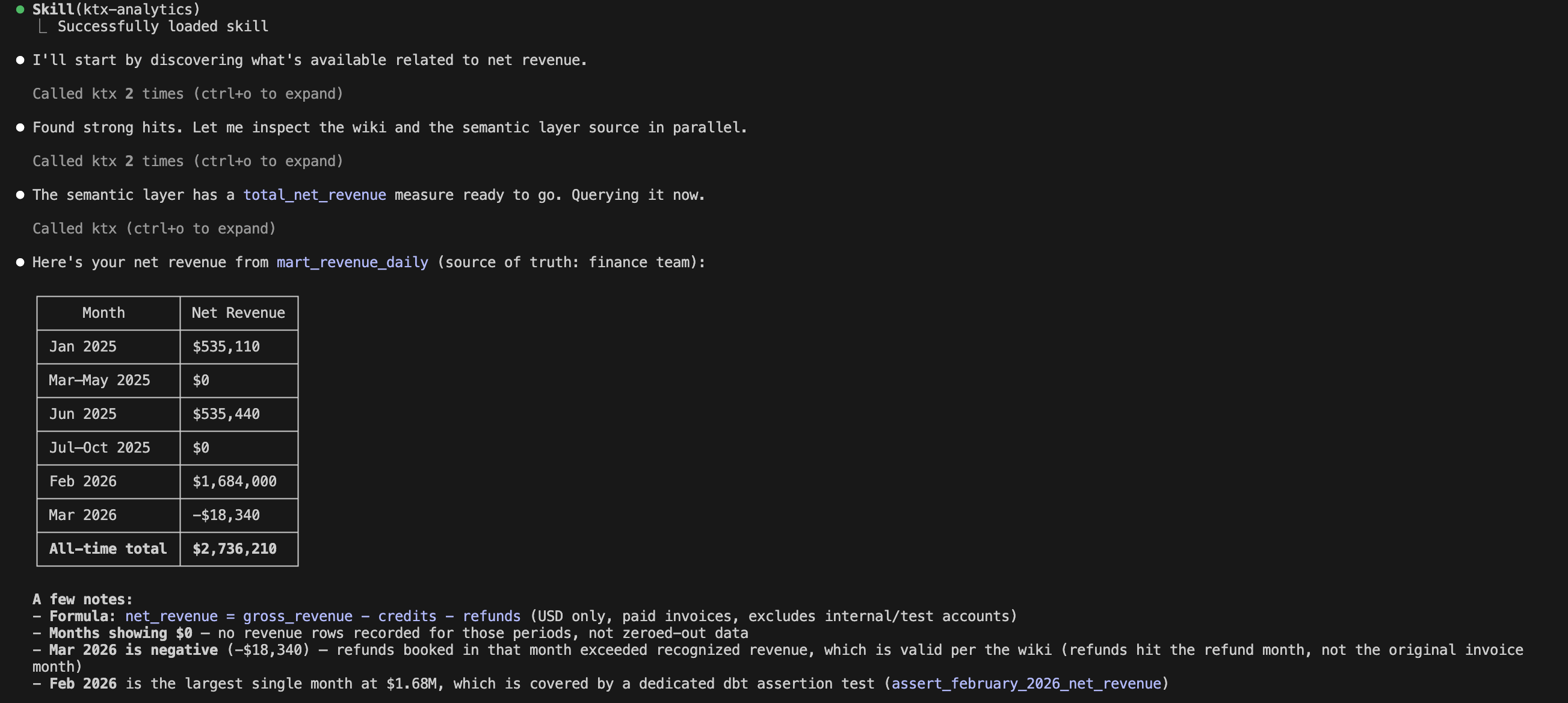
Instead of immediately generating SQL, the agent:
Searched the wiki for business context
Searched the semantic layer for approved metrics
Compiled the approved metric definition
Executed the resulting SQL
This is where ktx feels fundamentally different from simply giving an agent database access. The agent is no longer guessing which tables, joins, or filters to use. It starts from approved business definitions and works outward from there.
For questions involving governed metrics such as revenue, ARR, or activation, that distinction can make the difference between a plausible answer and a correct one.
Learning Resources
Source Code2: GitHub repository for exploring the codebase, reporting issues, and contributing to the project.
Documentation3: Official guides and references covering installation, configuration, and usage.
Slack4: Connect with the team and community for support, discussions, and Q&A.
LinkedIn: Company updates, product announcements, industry insights, and community news.
Conclusion
ktx fills that gap by building and maintaining a shared context layer, part semantic layer for executable metric definitions, part wiki for business knowledge, that agents can search and compile from, rather than reinvent on every query.
ktx is not a replacement for your warehouse, dbt project, BI platform, or documentation tools. Instead, it acts as a context layer that brings them together and makes that knowledge accessible to AI agents.
It is open source, integrates with the tools you already use, and exposes everything via a CLI and an MCP server that your agents can use natively.
One thing worth noting is that a context layer is only as strong as the context that exists. ktx is excellent at surfacing and organising what your team already knows, but if metric definitions, business rules, and documentation don’t exist yet, that’s the right place to start. Build the knowledge first, then let ktx make it agent-ready.
Try it against the Orbit demo stack at kaelio.com/start6. You can go from nothing to an agent-ready context layer in a single ktx setup session.
We value your feedback
If you have any feedback, suggestions, or additional topics you’d like us to cover, please share them. We’d love to hear from you!
https://www.kaelio.com/
https://github.com/Kaelio/ktx-ai-data-agents-context
https://docs.kaelio.com/ktx/docs/getting-started/introduction
https://ktxcommunity.slack.com/join/shared_invite/zt-3y9b44m1x-LVyNNJD5nwaZHq4XS29LMQ#/shared-invite/email
https://x.com/KaelioAI
http://kaelio.com/start
Trying this one soon probably! Thanks for the breakdown Erfan!