
Week 2/31: SQL Fundamentals for Data Engineering Interviews
Week 2 of 32-Week Data Engineering Interview Guide

In our previous post, we explored the role of a Data Engineer and Data Engineering Interviews. Building on that foundation, we dive into SQL fundamentals in this post.
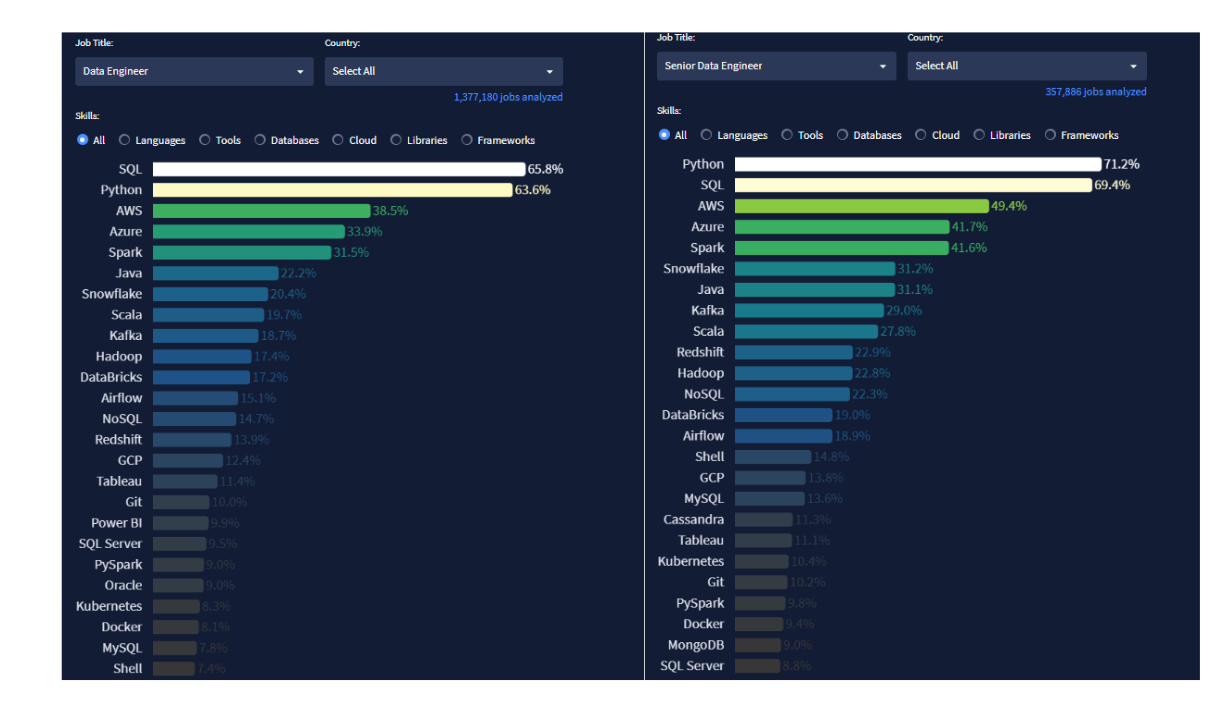
According to 2025 data from datanerd.tech1, SQL is the most in-demand skill for Data Engineers and Senior Data Engineers across all countries, appearing in 65.8% and 71.2% of job postings, respectively. This highlights SQL's critical role in data engineering workflows and its importance in interviews.
To see the full plan for the series, please check it out here2.
What This Post Covers:
This post focuses on solving SQL interview questions inspired by challenges posed by top companies like KPMG, Amazon, Apple, Microsoft, Dell, and UnitedHealth.
These questions are designed to test your technical understanding and hands-on query-writing skills. While the focus is primarily on Data Engineering interviews, we believe that professionals preparing for roles such as Data Analyst or Analytics Engineer will also find this post highly beneficial.
We assume you already have a foundational understanding of SQL. If you're new to SQL or want a quick refresher, we recommend starting with one of the following materials:
Topics included in this post:
JOINs
Aggregate Functions
Subqueries and Common Table Expressions (CTEs)
Date and Time Functions
NULL values
1. JOINs
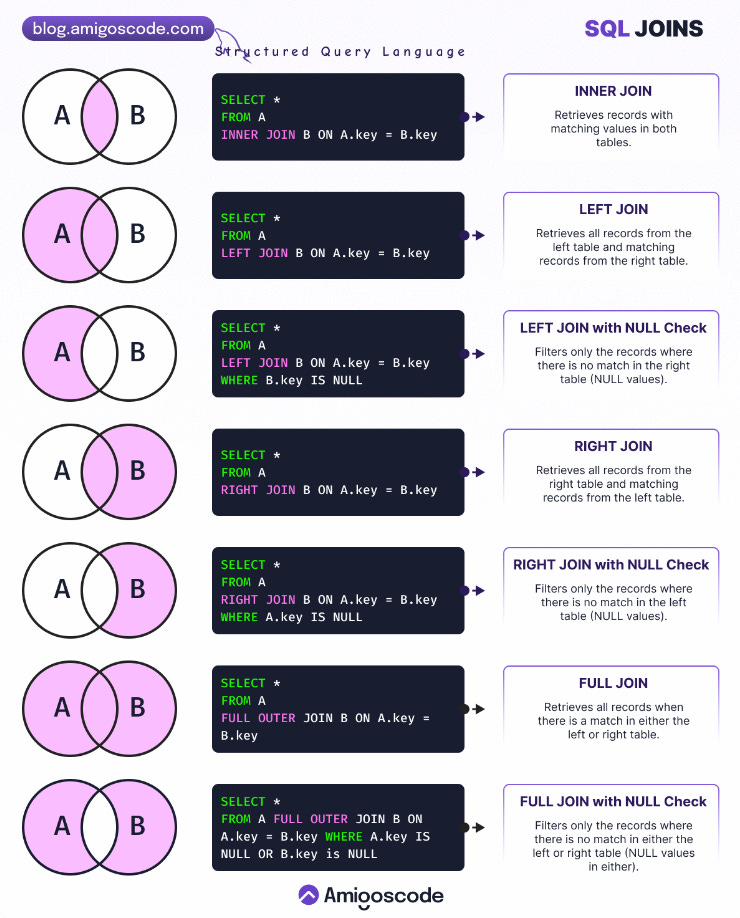
JOINs are SQL operations used to retrieve data from two or more tables by linking them through related columns. They are fundamental in combining data stored in separate normalised tables, making them crucial for creating cohesive datasets. The main types of JOINs include:
INNER JOIN: Matches rows in both tables.
OUTER JOINs (LEFT, RIGHT, FULL): Includes unmatched rows from one or both tables.
CROSS JOIN: Combines all rows from both tables.
JOINs are vital in relational databases, enabling seamless integration of data spread across multiple tables.
Tip: We highly suggest having the below visual by Amigoscode Newsletter in your pocket as an SQL Joins reference. It provides a clear and concise representation of how each type of join works.
1.1. Interview Question by KPMG
What is the difference between INNER JOIN and OUTER JOIN?
Answer:
INNER JOIN: Returns only the rows where there is a match in both tables. Rows with no matching values are excluded.
OUTER JOIN: Includes rows that do not have matches in one or both tables. This can be:
LEFT JOIN: All rows from the left table, with
NULLfor unmatched rows from the right.RIGHT JOIN: All rows from the right table, with
NULLfor unmatched rows from the left.FULL OUTER JOIN: All rows from both tables, with
NULLfor unmatched rows from either side.
Further Practice Suggestions
2. Aggregate Functions
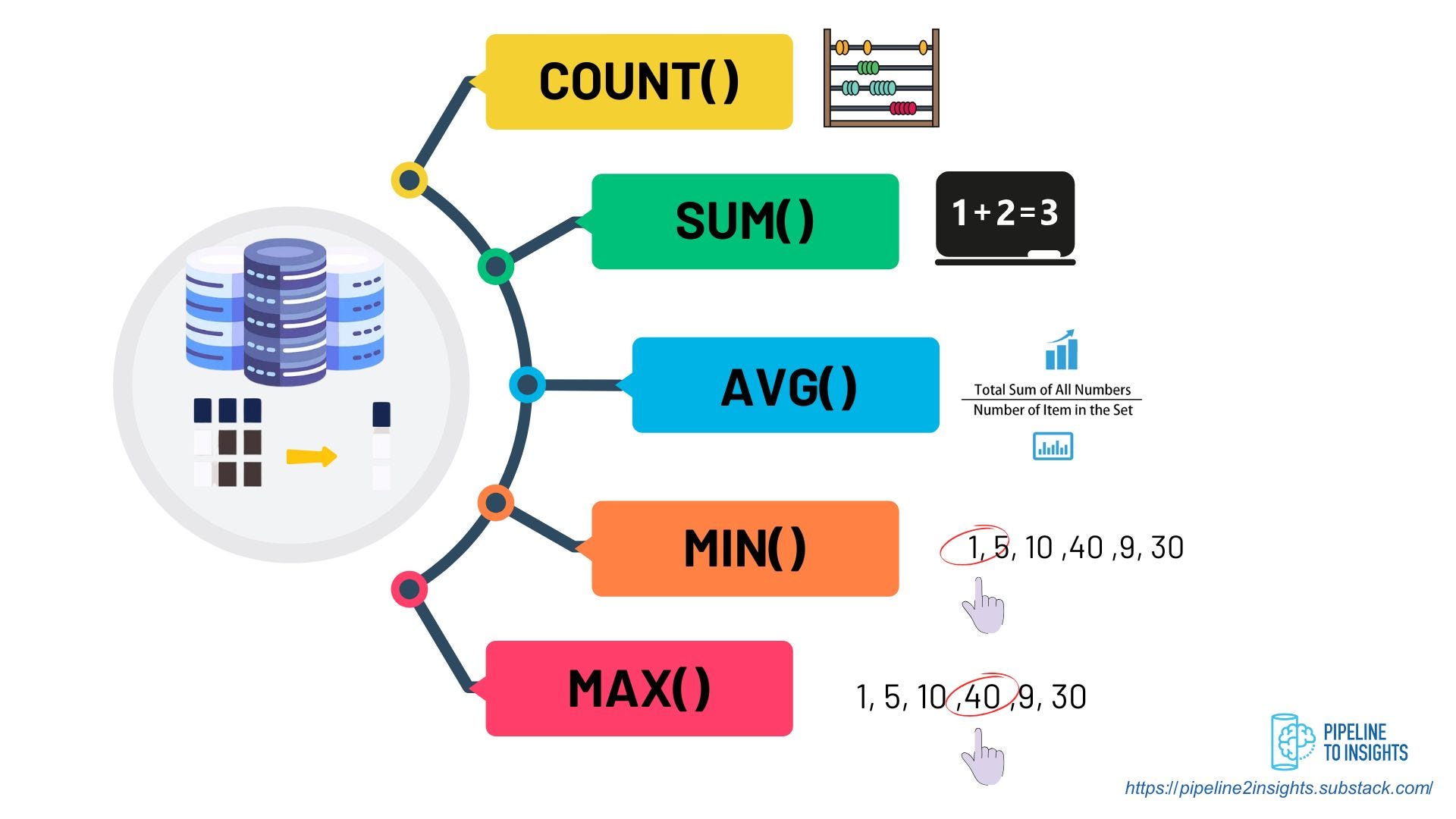
Aggregate functions summarise data from multiple rows into a single result. These functions are commonly used to compute metrics such as totals, averages, and counts, enabling meaningful analysis of large datasets. Key aggregate functions include:
COUNT(): Counts the number of rows.
SUM(): Calculates the sum of numeric values.
AVG(): Determines the average value.
MIN() and MAX(): Identify the smallest and largest values.
Aggregate functions often work alongside the GROUP BY clause to group data before applying the function.
2.1. Interview Question by Amazon10
Write a query to retrieve the average star rating for each product, grouped by month.
reviews:
Column Name	Type
review_id	integer
user_id	        integer
submit_date	datetime
product_id	integer
stars	        integer (1-5)
Thinking Steps:
I need to group the data by month and product to calculate the average star rating for each product in each month.
Then, I’ll extract the month from the
submit_datecolumn to group the data by month.Next, I’ll calculate the average
starsfor each group and round it to two decimal places.Finally, I’ll sort the results by month and then by product for clear organisation.
Answer:
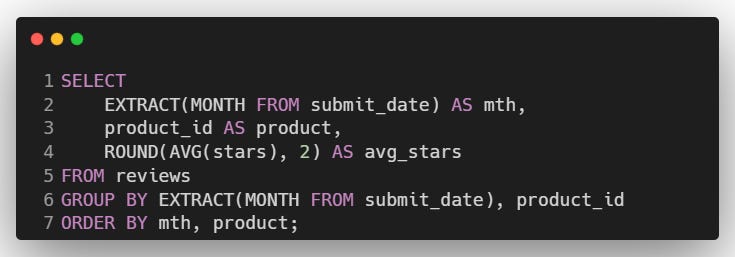
Explanation:
EXTRACT(MONTH FROM submit_date): Extracts the month from the
submit_datecolumn.ROUND(AVG(stars), 2): Calculates and rounds the average star rating.
GROUP BY: Group data by month and product.
ORDER BY: Sorts results by month and product.
2.2. Interview Question by Apple11
Count the number of user events performed by MacBook Pro users. Output the result along with the event name. Sort the result based on the event count in descending order.
playbook_events:
Column Name	  Type
device            text
event_name        text
event_type        text
location          text
occurred_at       timestamp without time zone
user_id           bigint
Thinking Steps:
First, I need to filter the data to include only events performed by MacBookPro users.
Then, I’ll group the data by event name to count the occurrences of each event.
Finally, I’ll sort the results in descending order based on the event count.
Answer:
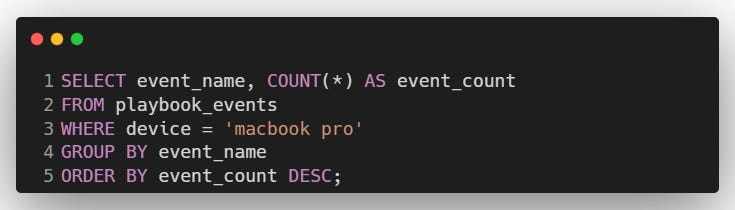
Explanation:
SELECT: Retrieves the event name and the count of occurrences.
WHERE: Filters records to include only 'MacBook Pro'.
GROUP BY: Groups the data by
event_name.ORDER BY: Sorts the results in descending order based on the event count.
Further Practice Suggestions
3. Subqueries and Common Table Expressions (CTEs)
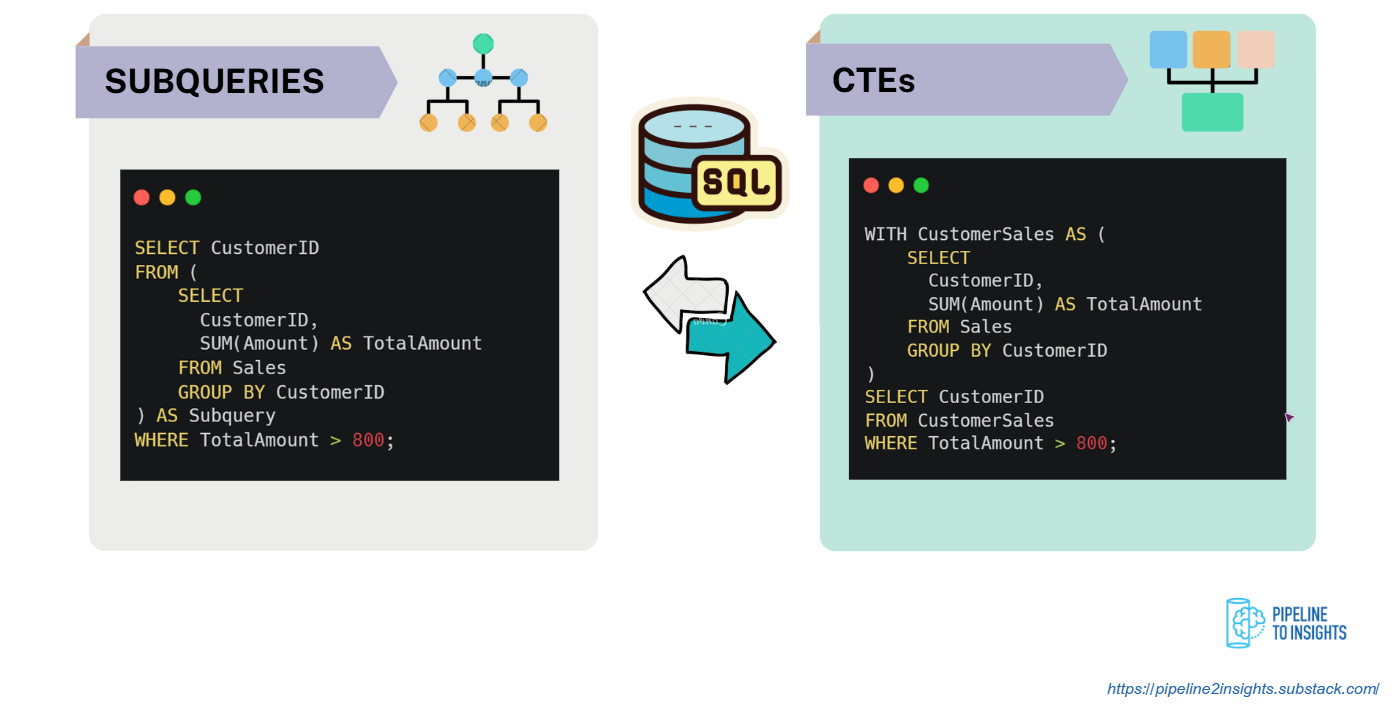
Subqueries and Common Table Expressions (CTEs) simplify complex queries by structuring intermediate results.
Subquery: A query nested inside another query. It is enclosed in parentheses and evaluated when needed, often used for filtering or calculating values.
CTE: Defined using the
WITHkeyword, it is a temporary named result set that can be reused multiple times in the same query, improving readability and efficiency.
Both techniques help modularise SQL code, making it easier to debug and maintain.
3.1. Question
What is the difference between a Subquery and a CTE?
Answer:
A subquery is a query nested inside another query and evaluated each time it appears in the query.
Unlike subqueries, a CTE is defined once and can be reused multiple times within the same query, which can improve performance and clarity.
I’d use a CTE when:
I need to reuse the result set multiple times, or,
want to improve query readability.
A subquery is sufficient for a simple one-time calculation or filtering step.
3.2. Interview Question by Microsoft16
Write a query to identify Microsoft Azure Supercloud customers who have purchased at least one product from every product category listed in the
productstable.
customer_contracts:
Column Name	Type
customer_id	integer
product_id	integer
amount	        integer

products:
Column Name	  Type
product_id	  integer
product_category  string
product_name	  string
Thinking Steps:
I need to join the
customer_contractsandproductstables to associate customers with the product categories they’ve purchased.Next, I'll group the data by
customer_idto calculate how many unique categories each customer has purchased.Then, I’ll compare this count with the total number of categories in the
productstable using a subquery.Finally, I'll use a
HAVINGclause to filter out customers who don’t meet the criteria.
Answer:
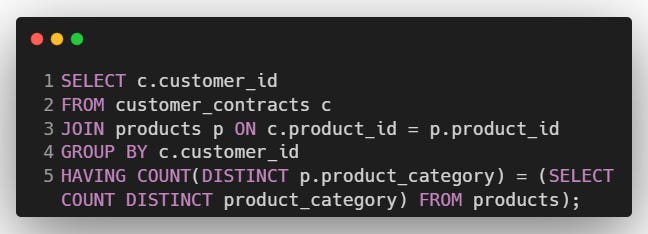
Explanation:
JOIN Clause: Links
customer_contractsandproductstables to associate each customer with the categories of the products they purchased.GROUP BY Clause: Groups the data by
customer_idto calculate aggregated metrics for each customer.COUNT(DISTINCT p.product_category): Counts the unique product categories purchased by each customer.
Subquery: Calculates the total number of unique product categories available.
HAVING Clause: Filters customers whose unique category count matches the total number of categories from the subquery.
Further Practice Suggestions
4. Date and Time Functions

Date and Time functions allow manipulation of temporal data, enabling operations such as:
Extracting specific parts:
EXTRACT(field FROM source): Retrieves components like YEAR, MONTH, or DAY.
Example:
EXTRACT(YEAR FROM '2024-12-19')returns2024.
Performing arithmetic:
DATEDIFF(end_date, start_date): Calculates the difference between two dates.
Example:
DATEDIFF('2024-12-31', '2024-12-01')returns30.DATEADD(interval, value, date): Adds a specified interval to a date.
Example:
DATEADD(DAY, 5, '2024-12-19')returns2024-12-24.
Formatting:
TO_CHAR(date, format): Converts a date to a string in the specified format.
Example:
TO_CHAR('2024-12-19', 'YYYY/MM/DD')returns2024/12/19.
These functions are essential for time-series analysis, event tracking, and scheduling tasks in SQL.
4.1. Interview Question by Dell20
Write a query to return the number of unique users per client per month.
fact_events:
Column Name	Type
client_id       text
customer_id     text
event_id        bigint
event_type      text
id              bigint
time_id         date
user_id         text
Thinking Steps:
The goal is to calculate the number of unique users (
user_id) for each client (client_id) grouped by month.I’ll first extract the month from the
time_idcolumn usingEXTRACT(MONTH FROM time_id).Next, I’ll use
COUNT(DISTINCT user_id)to calculate the number of unique users for each combination ofclient_idand month.I’ll group the results by
client_idand a month to ensure the counts are calculated separately for each client and time period.Finally, I’ll sort the results by
client_idandmonthto make the output easy to read and well-organised.
Answer:
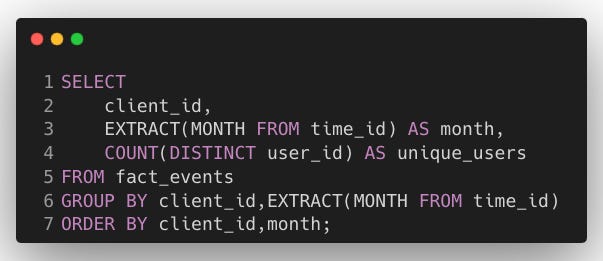
Explanation:
EXTRACT(MONTH FROM time_id) in SELECT: Extracts the month from the
time_idcolumn to group the data by month.COUNT(DISTINCT user_id) in SELECT: Counts the distinct users (
user_id) who performed any event during the specified month for a given client.GROUP BY client_id, EXTRACT(MONTH FROM time_id): Groups the data by
client_idand month.ORDER BY client_id, month: Sorts results by client and month.
Further Practice Suggestions
5. NULL Values
NULL represents missing or undefined data in SQL. Handling NULL values is crucial for accurate data processing. Key strategies include:
IS NULL / IS NOT NULL: Filters rows with or without NULL values.
COALESCE(): Substitutes NULL with a specified default value.
IFNULL(): Similar to
COALESCE(), used in MySQL.
Proper handling of NULL values ensures data consistency and prevents unexpected results in calculations or aggregations.
5.1. Interview Question by UnitedHealth25
Calculate the percentage of calls that are uncategorised (i.e., have
call_categoryasNULLor'n/a'), rounded to one decimal place.
callers:
Column Name	     Type
policy_holder_id     integer
case_id	             varchar
call_category	     varchar
call_date	     timestamp
call_duration_secs   integer
Thinking Steps:
First, I need to identify calls that are uncategorised. These are calls where the
call_categoryis either'n/a'orNULL.Next, I’ll calculate the total number of calls and the number of uncategorised calls.
Then, I’ll compute the percentage of uncategorised calls by dividing the number of uncategorised calls by the total number of calls and multiplying by 100.
Finally, I’ll round the result to one decimal place as required.
Answer:
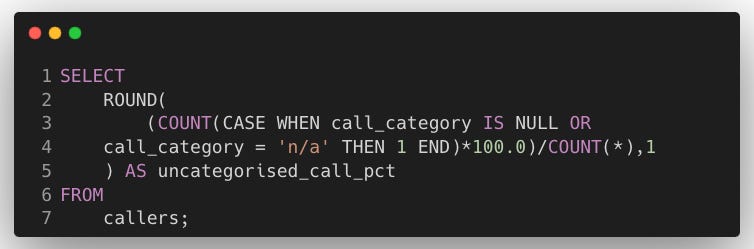
Explanation:
COUNT(CASE WHEN …): Counts the number of uncategorised calls where
call_categoryis eitherNULLor'n/a'.Percentage Calculation: Divides the count of uncategorised calls by the total number of calls, multiplies by 100.0 (to ensure accurate decimal handling), and rounds the result to 1 decimal place using
ROUND.
5.2. Question
What does the COALESCE function do?
Answer:
The COALESCE function in SQL returns the first non-NULL value from a list of expressions. It is commonly used to handle NULL values by providing a default value or a fallback option.
I’d use COALESCE when;
Replacing NULL values: Substitute NULLs with meaningful defaults.
Fallback logic: Provide alternative values when primary values are unavailable.
Simplifying queries: Avoid lengthy
CASEstatements when handling NULLs.
5.3. Question for Handling Nulls in Aggregations
Write a query to calculate the total revenue for each
region. If allorder_amountValues in a region areNULL, display the revenue as 0 instead ofNULL.
orders:
Column Name	Type
order_id        integer
region	        varchar
order_amount    integer
Thinking Steps:
I need to calculate the total revenue for each region using the
SUM()function.By default,
SUM()returnsNULLif all values in the column areNULL, so I’ll handle this case explicitly.I’ll use the
COALESCE()function to replace theNULLresult fromSUM()with 0 for regions where there are no valid order amounts.Finally, I’ll group the data by
regionto calculate the totals for each region separately.
Answer:
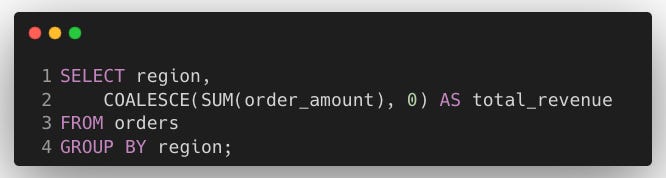
Explanation:
SUM(order_amount): Calculates the total order amount for each region. If there are no valid (non-NULL)
order_amountvalues for a region, the result isNULL.COALESCE(SUM(order_amount),0): Replaces the
NULLresult fromSUM()with 0.GROUP BY region: Group the rows by
region, ensuring that the aggregation (SUM) is calculated separately for each region.
Further Practice Suggestions
Conclusion
This post has covered key SQL concepts that are not only fundamental for data engineering workflows but are also highly relevant for SQL interviews.
Here’s a quick recap of the topics we covered:
JOINs: Essential for combining data across multiple tables, including INNER, OUTER, and CROSS JOINs.
Aggregate Functions: Techniques to summarise data, such as
COUNT,SUM, andAVG.Subqueries and Common Table Expressions (CTEs): Strategies to simplify and modularise complex queries.
Date and Time Functions: Methods for manipulating temporal data, like
EXTRACT,DATEDIFF, andTO_CHAR.NULL Handling: Handling missing data using
COALESCE,IS NULL, and aggregation techniques.
Understanding and applying these SQL concepts builds a solid foundation for SQL interviews.
In the next post, Advanced SQL Concepts, we’ll explore:
Set Functions
Window Functions
Recursive CTEs and Hierarchical Queries
Indexes
In case you missed the previous post, check it out for an Introduction to Data Engineering Interviews:

We Value Your Feedback
If you have any feedback, suggestions, or additional topics you’d like us to cover, please share them with us. We’d love to hear from you!
https://datanerd.tech/
https://pipeline2insights.substack.com/t/interview-preperation
https://www.w3schools.com/sql/sql_intro.asp
https://sqlzoo.net/wiki/SQL_Tutorial
https://datalemur.com/questions/sql-well-paid-employees
https://platform.stratascratch.com/coding/10087-find-all-posts-which-were-reacted-to-with-a-heart
https://platform.stratascratch.com/coding/9913-order-details
https://leetcode.com/problems/managers-with-at-least-5-direct-reports/description/?envType=study-plan-v2&envId=top-sql-50
https://www.datacamp.com/cheat-sheet/sql-joins-cheat-sheet
https://datalemur.com/questions/sql-avg-review-ratings
https://platform.stratascratch.com/coding/9653-count-the-number-of-user-events-performed-by-macbookpro-users
https://datalemur.com/questions/sql-histogram-tweets
https://datalemur.com/questions/cards-issued-difference
https://leetcode.com/problems/confirmation-rate/description/?envType=study-plan-v2&envId=top-sql-50
https://platform.stratascratch.com/coding/9622-number-of-bathrooms-and-bedrooms
https://datalemur.com/questions/supercloud-customer
https://leetcode.com/problems/consecutive-numbers/description/?envType=study-plan-v2&envId=top-sql-50
https://datalemur.com/questions/frequent-callers
https://datalemur.com/questions/sql-swapped-food-delivery
https://platform.stratascratch.com/coding/2024-unique-users-per-client-per-month
https://datalemur.com/questions/sql-average-post-hiatus-1
https://platform.stratascratch.com/coding/9847-find-the-number-of-workers-by-department
https://datalemur.com/questions/second-day-confirmation
https://leetcode.com/problems/monthly-transactions-i/description/?envType=study-plan-v2&envId=top-sql-50
https://datalemur.com/questions/uncategorized-calls-percentage
https://datalemur.com/questions/tesla-unfinished-parts
https://leetcode.com/problems/customer-who-visited-but-did-not-make-any-transactions/description/?envType=study-plan-v2&envId=top-sql-50
https://datalemur.com/questions/sql-ibm-db2-product-analytics
https://www.w3schools.com/sql/sql_isnull.asp