
Week 3/31: Advanced SQL Concepts for Data Engineering Interviews
Week 3 of 32-Week Data Engineering Interview Guide

In the previous post, we explored SQL Fundamentals, covering essential topics such as Joins, Aggregate Functions, Subqueries, Common Table Expressions (CTEs), Date and Time Functions, and Null Values.
If you missed the previous post, you can check it out here:

To see the full plan for the series, please check it out here1.
What This Post Covers
This post builds on the fundamentals by focusing on Advanced SQL Concepts through solving SQL interview questions in a structured, three-step approach:
Thinking Steps: We’ll walk through the thought process before solving a problem, as explaining your thoughts is a key skill for live interviews.
Solution Query: We’ll write the SQL solution to solve the problem efficiently.
Explanation: We’ll break down the solution to ensure a clear understanding of the query and its logic.
We’ll tackle SQL Interview Questions from top companies like Amazon, Apple, Microsoft, Google, PwC, Uber and so on. These questions are designed to test your technical understanding and your ability to write practical queries for real-world scenarios.
While this post primarily targets Data Engineering interviews, we believe professionals preparing for roles such as Data Analyst, Analytics Engineer or similar will also find it beneficial.
Topics included in this post:
Set Operations
Window Functions
Recursive CTEs and Hierarchical Queries
Indexes
1. Set Operations
Set operations in SQL allow us to combine or compare the results of two or more SELECT statements, much like mathematical set operations. These operations enable powerful analysis of data from multiple sources or perspectives, making them essential tools for data manipulation in SQL.
Set operations include UNION, UNION ALL, INTERSECT, and EXCEPT, and they help in solving complex problems by comparing or merging datasets.
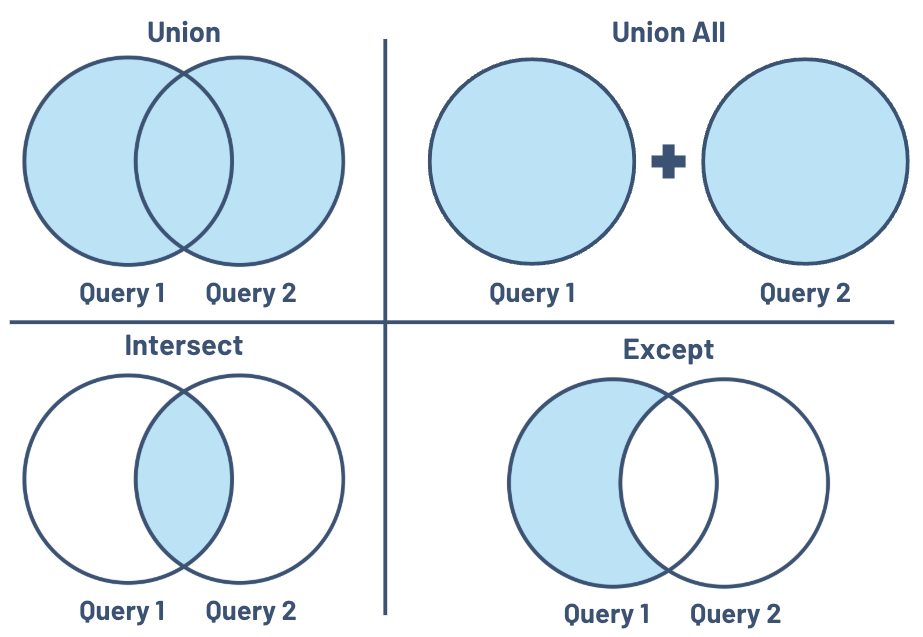
Here’s a quick breakdown of the core set operations:
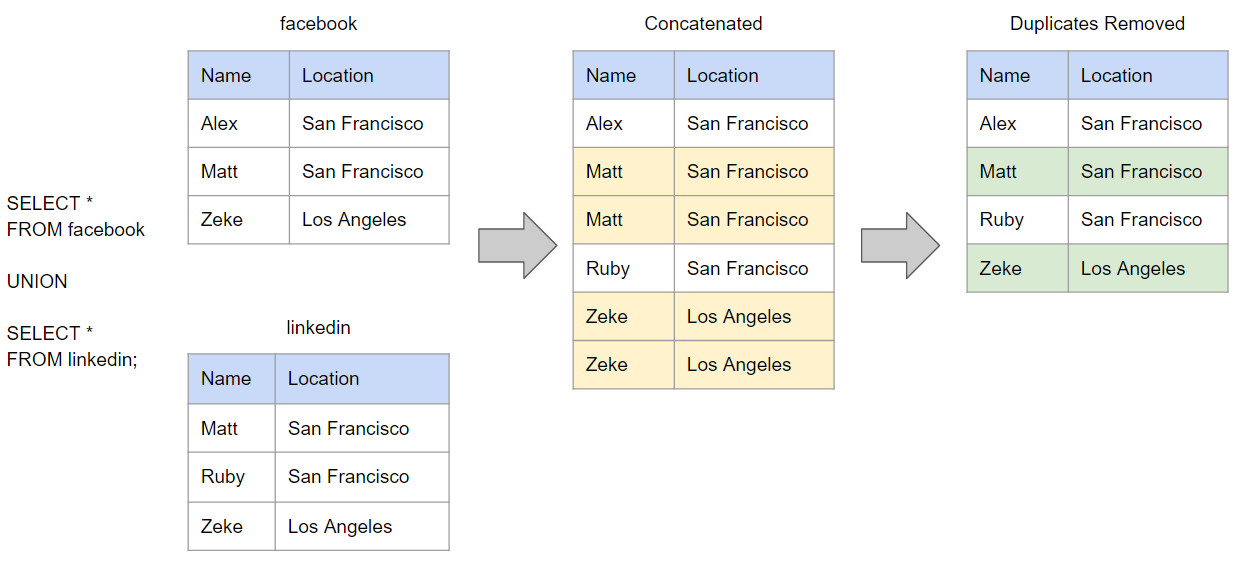
UNION:
Combines unique rows from two or more SELECT statements, removing duplicates.
Example Use Case: Merging datasets from two different regions without duplicate entries.
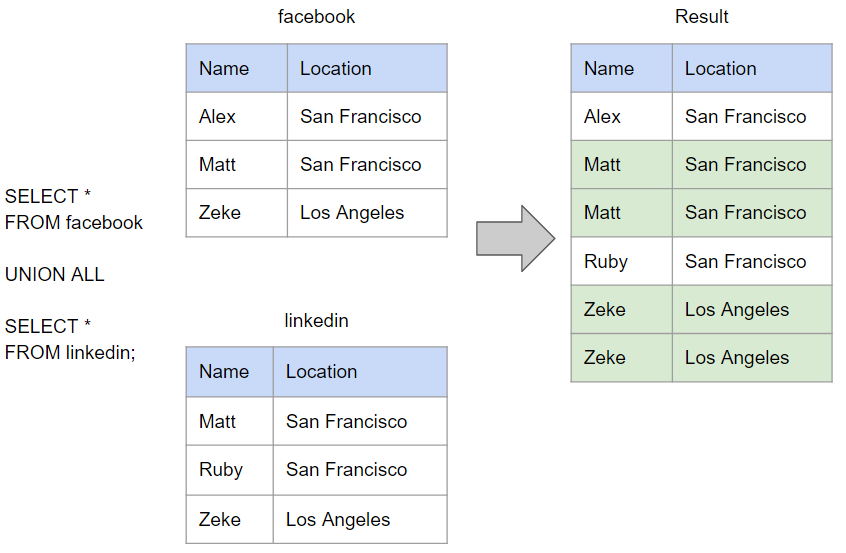
UNION ALL:
Combines all rows from two or more SELECT statements, including duplicates.
Example Use Case: Aggregating all sales data, even if some records overlap.
INTERSECT:
Returns rows that are present in both SELECT statements.
Example Use Case: Identifying customers who made purchases in two separate campaigns.

stratascratch
EXCEPT:

The MINUS operator is primarily used in Oracle and some other databases, while the EXCEPT operator serves a similar function and is used in SQL Server, PostgreSQL, and other databases.
Returns rows from the first SELECT statement that are not present in the second.
Example Use Case: Finding employees in one department who aren’t in another.
Tips to be aware of by using set operations:
Column Matching: The SELECT statements being compared must have the same number of columns and matching data types.
Order of Execution: Set operations should be performed after individual SELECT statements and before any ORDER BY clause.
Sorting: UNION and INTERSECT automatically remove duplicates, which involves sorting the result set. For UNION ALL, no sorting occurs unless explicitly specified.
1.1. Interview Question by Facebook2
Write a query to return the IDs of the Facebook pages that have zero likes. The output should be sorted in ascending order based on the page IDs.
pages:
Column Name	Type
page_id	        integer
page_name	varchar

page_likes:
user_id         integer
page_id         integer
liked_date      datetime
Thinking Steps:
I’ll compare the
page_idvalues in thepagestable with thepage_idvalues in thepage_likestable.Then, using the
EXCEPToperator, I’ll retrieve IDs from thepagestable that does not exist in thepage_likestable.No need for further sorting since
EXCEPToperator sorts the result in ascending order by default.
Answer:

Explanation:
SELECT page_id FROM pages: Retrieves all
page_idvalues from thepagestable.EXCEPT SELECT page_id FROM page_likes: Filters out
page_idvalues that are present in thepage_likestable.Sorting: The
EXCEPToperator inherently ensures that the result is sorted in ascending order by default.
1.2. Question: Performance Comparison of UNION and UNION ALL
You are given two tables containing sales data for two different regions. Write queries using both
UNIONandUNION ALLto combine the sales data from the two regions into a single result set. Compare the performance differences between the two operations and explain in which scenarios each should be used.
region_a_sales:
Column Name	Type
sale_id         integer
product_id      integer
amount          integer

region_b_sales:
Column Name	Type
sale_id         integer
product_id      integer
amount          integer
Answer:
To combine sales data from both regions, I can use either
UNIONorUNION ALLdepending on whether I want to eliminate duplicates or keep all rows.Using
UNION, I can merge the results and remove duplicates, but this requires additional computation for sorting and deduplication.Using
UNION ALL, I can merge the results while retaining duplicates, making it faster since no deduplication is needed.
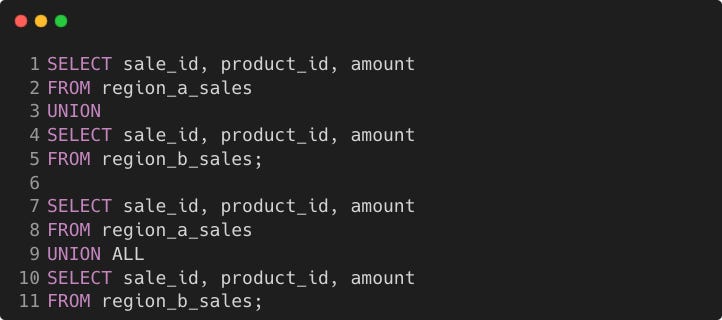
In terms of performance, UNION ALL is faster since no sorting or deduplication is needed while UNION requires them.
I’d use UNION where unique rows are critical, like reconciling records or preparing reports.
I’d use UNION ALL for tasks like aggregating raw data or loading staging tables where duplicates are acceptable.